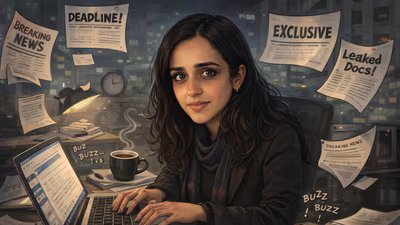
A new AI-driven trend is sweeping social media, with people around the world sharing cartoon-style portraits of their lives and workplaces generated using ChatGPT.
The trend involves uploading a personal photo to the OpenAI platform and asking the system to create a caricature based on one’s chat history and professional persona.
The resulting images are exaggerated, stylised cartoons that place people in imagined work environments.
Backgrounds often include elements associated with their life and professions- such as laptops, books, microphones, studios or office desks, while facial expressions and body language are intentionally over-the-top.
Many people are sharing the results on platforms such as Instagram, X and LinkedIn.
Also Read | Claude Opus 4.6: 5 key Anthropic updates for everyday workplace use; ‘outperforms OpenAI’s GPT’
What’s new in AI caricatures?
Unlike earlier AI portrait trends that relied solely on photographs, this one adds a layer of contextual personalisation.
The AI uses patterns from a person’s interactions on the platform, including tone, interests and frequently-discussed topics, to generate a scene that reflects how it interprets several aspects of their lives.
How to create your own AI workplace caricature
- First, log in to the OpenAI platform using your account, so the system can access your chat context.
- Next, upload a clear photograph of yourself. Images with good lighting and a visible face tend to work best.
- Then, enter a prompt asking the AI to generate an image inspired by your workplace or any other aspect of your life, using the details and context you’ve shared so far.
- You can also keep it broad or add details about yourself and set the tone.
- Once the image is generated, review the result. If needed, refine the prompt and try again until the output feels right.
- Finally, download the image and share it online if you choose. Many are sharing these images on social media now.